Netskope, Zscaler, Palo Alto, and Skyhigh have all pushed harder into “AI security” marketing over the past year. Read the product pages closely and the pattern is obvious: discovery, visibility, governance, sanctioned use, shadow AI. Useful terms. Also slippery ones.
The gap is architectural.
CASBs were built to inspect SaaS access through APIs, proxies, and policy controls around sanctioned cloud apps. ChatGPT, Copilot, Gemini, and Claude prompts are different. They are user-typed or pasted browser input, created in the moment, then sent from the page.
If your control point lives at the SaaS governance layer, you are usually seeing app access. You are not seeing the sensitive sentence your employee just pasted into the prompt box.
That matters because data loss in AI tools happens before the model answers. The risk event is the prompt submission itself.
This is where vendor language gets messy. “AI governance” in a CASB often means:
- block access to certain AI domains
- inventory which AI apps users visit
- track access time and user activity at the app level
Those are real controls. They are also not prompt DLP.
Prompt DLP is browser-side content inspection before send. Different control plane. Different telemetry. Different response options.
If your CASB vendor tells you they cover ChatGPT data loss prevention, ask one technical question: can you inspect and classify the exact text a user pastes into the prompt box before it leaves the browser?
In most deployments, the answer is no.
The reason is simple. The CASB does not naturally sit inside the browser event where a user pastes 500 rows of customer data into an AI tool. It can see that a session reached chat.openai.com. It may know who the user is. It may know how long they stayed. It may even block the domain outright.
What it cannot usually do is inspect the prompt content in context and decide, at that moment, whether to allow, warn, redact, or block.
That is not a small feature gap. It is a different architecture.
Take a simple example. Your employee opens ChatGPT in Chrome and pastes this:
Analyse these support tickets and suggest pricing concessions for renewal: customer names, contract values, health scores, renewal dates, and NPS comments are below.A CASB that advertises “AI governance” may never see that sentence at all.
It sees the site. Not the prompt.
The same problem gets clearer with more concrete examples:
I'm pasting our customer churn CSV into ChatGPT to analyse patterns — [500 rows]CASB sees: user visited chat.openai.com for 12 minutes
Draft a retention plan for our top 20 at-risk accounts: [account data]CASB sees: user on chatgpt.com
That is the fidelity problem in one line. The audit trail sounds active because there is a log entry. The useful part is missing.
A browser-layer control sees the prompt content before send. That means it can classify what is in the text: PII, financial records, source code, customer account data, legal terms, internal confidential material. It can respond with more than a binary allow-or-block. You can warn on moderate risk, redact high-risk fields, or block outright when the data crosses your threshold.
That is the difference between “AI app governance” and actual data loss prevention for AI prompts.
To be fair, CASBs are excellent at what they were built for. If you need sanctioned SaaS governance, cloud app discovery, tenant restrictions, and policy around approved services, they still matter.
This is not an argument against CASBs. It is an argument against pretending a SaaS control plane automatically extends into prompt-level browser interactions.
It does not.
The browser is where the risky act happens. A user copies a spreadsheet from your CRM. A lawyer pastes draft deal terms into Claude. A success manager drops account notes into ChatGPT. A claims analyst asks Gemini to summarise records that include identifiers.
Those actions happen in the tab, before the request becomes just another encrypted session to a well-known AI domain.
If you want to control that moment, you need a browser-resident control.
This is the granularity gap made visible:
- CASB sees: domain, user, session time, maybe app category
- Browser prompt DLP sees: the actual content, the risk category, and the right response at the moment of paste
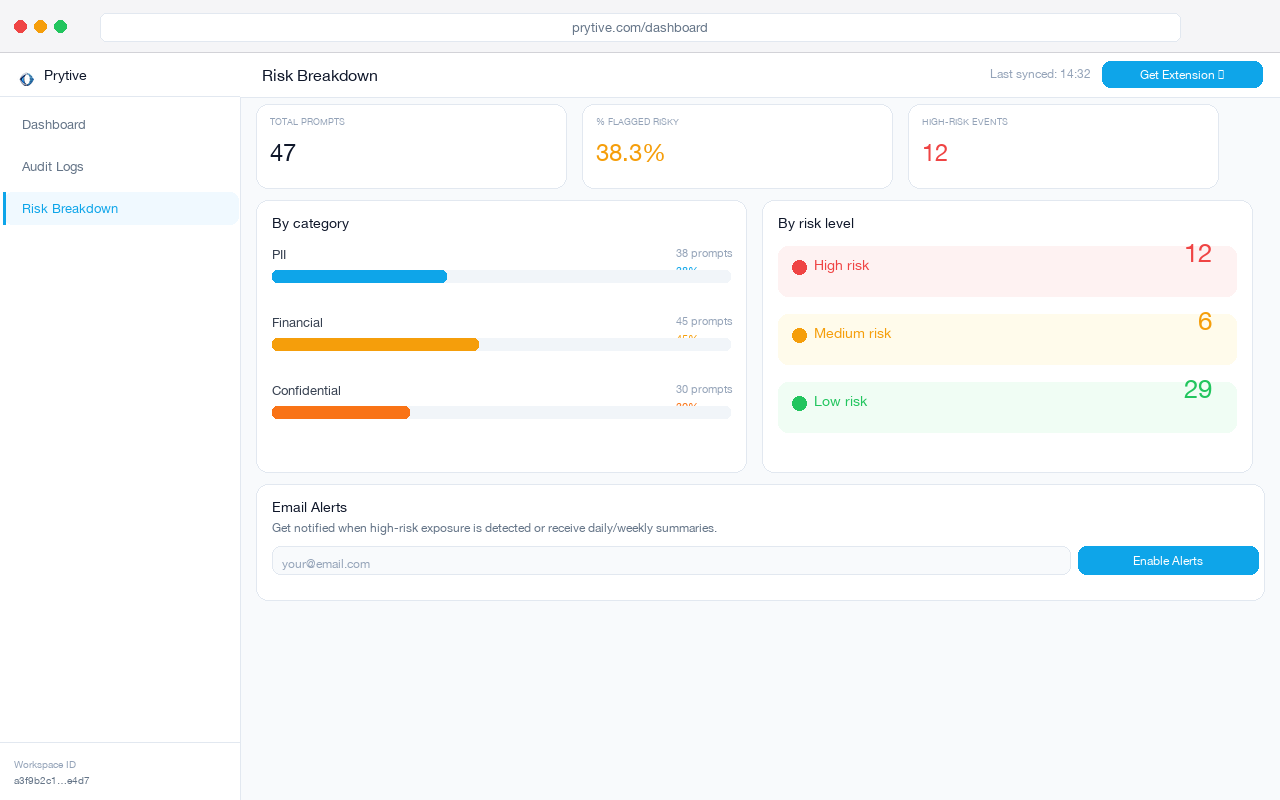
That level of detail changes incident response as well. When a regulator asks what left the browser, “user accessed ChatGPT” is weak evidence. Under GDPR Article 5(1)(c), data minimisation is not satisfied by broad app-level logging. Under HIPAA 45 CFR §164.312(e)(1), transmission safeguards are about protecting ePHI in transit, not just noting that someone visited a site. If your team handles financial data, SEC Regulation S-P §248.30 requires written policies to protect customer records and information.
None of those obligations get easier because your CASB counted AI sessions.
What CASB “AI security” features typically are:
- domain blocklists for AI sites
- app inventory and shadow AI discovery
- access-time tracking and user-level app usage logs
- policy around sanctioned versus unsanctioned AI services
What they typically are not:
- prompt content inspection before submission
- in-context classification of what a user typed or pasted
- graduated response at the moment of paste
- redaction of sensitive fields in-browser before the request is sent
That last point is where teams usually wake up. Blocking every AI domain is blunt and expensive. People route around it fast. Allowing everything with app-level logging is almost as weak.
The practical middle ground is content-aware control in the browser: inspect the prompt, classify the data, then decide whether to allow, warn, redact, or block.
If your current vendor says they already do this, pressure-test the claim.
Questions to ask your CASB vendor
- Can you show me the exact prompt content a user attempted to submit to ChatGPT, Copilot, Gemini, or Claude before it was sent?
- Can you classify that prompt in context, distinguish PII from financial data from internal confidential text, and apply different actions at paste time?
- In the audit log, do I get a redacted record of the risky prompt itself, or just evidence that the user accessed an AI domain?
Those questions cut through most slideware in under five minutes.
If the answers drift back to discovery dashboards, sanctioned app lists, and browser session metadata, you have your answer. Your CASB is doing CASB work. Fine. But that is not ChatGPT data loss prevention.
Pilot a browser-layer control alongside your CASB and compare the fidelity of the audit trail. If one tool tells you “user spent 12 minutes on chat.openai.com” and the other shows a redacted record of the actual prompt risk, you will know which control is carrying the DLP load. Prytive is one way to run that comparison.