A 72-hour AI incident response is the process you run once you become aware that personal data entered, surfaced, or processed through an AI tool may have been exposed, retained, or disclosed in a way that may trigger GDPR Article 33 notification duties. For AI incidents, the first job is preserving prompt evidence before it disappears.
| Scenario | First 24h | By 72h | Evidence to retain | |---|---|---|---| | Employee pasted customer data into public LLM | Stop further use, identify tool and account tier, interview user, assess categories of data and data subjects | Decide Article 33 notification, assess Article 34 high-risk notice, notify customer if their data is involved | Redacted prompt, timestamp, tool + account tier, user ID, affected data subjects, vendor retention policy | | Copilot surfaced restricted file to wrong user | Preserve access logs, confirm scope of file exposure, suspend risky sharing path | Assess breach risk, notify authority if required, document containment and remediation | File path, surfaced content summary, timestamp, recipient identity, permissions state, audit logs | | Shadow AI tool discovered with PII history | Freeze use, capture account details, export available history, identify uploader and datasets | Determine duration, scale, processor status, and reporting duties | Redacted history, timestamps, billing/admin records, user IDs, vendor retention terms | | Third-party processor used unsanctioned AI on your data | Trigger contract escalation, demand preservation, obtain vendor statements and logs | Decide controller/processor notification path, notify customers and insurer where needed | Contract terms, processor notice, tool/account details, affected records, retention and deletion evidence |
At 4:47pm on a Friday, this rarely arrives as a clean ticket titled “possible GDPR Article 33 event.” It comes in sideways. A sales rep mentions using ChatGPT to tidy a spreadsheet. A customer asks whether their file was run through Copilot. Someone finds Gemini tabs in browser history. Your 72 hours start from awareness, not from the moment the prompt was pasted.
When the 72-hour clock starts
GDPR Article 33 requires notice to the supervisory authority without undue delay and, where feasible, within 72 hours after becoming aware of a personal data breach. That word matters: aware. Not certain. Not after your full root-cause report. Document the exact moment awareness was established and by whom.
Use plain facts.
If the first reliable signal was a Slack message three weeks later, that may be your awareness point.
"4:47pm Fri, rep pastes: 'Can you reformat this patient list...' [47 records] — ChatGPT.com consumer account""3 weeks later, Slack message: 'hey did we ever get back to that clinic about their list?' — first moment of awareness"That distinction saves bad arguments later. Regulators such as the ICO will ask when you knew enough to act, what you did next, and whether the delay was justified. If you are an essential or important entity under NIS2, Article 23 may add separate cyber incident reporting timelines. If health data is involved in the US, HIPAA §164.404 covers individual notification and §164.410 covers notification by a business associate.
The evidence to preserve first
AI-channel incidents have a different evidence shape from a normal breach. Your order of priority is simple.
- Redacted prompt
- Timestamp
- Tool and account tier
- User ID
- Data subjects affected
- Retention policy of the AI vendor for that account
That sixth item gets missed constantly.
It should not. OpenAI, Anthropic, and Google do not all handle retention the same way, and their terms vary by product tier. OpenAI has publicly said its API platform retains customer API data for abuse monitoring for up to 30 days by default, with approved low-retention or zero-retention paths for some enterprise use cases. Consumer ChatGPT services have historically retained conversation history longer, subject to settings and product terms. Google Workspace and Gemini enterprise controls differ from consumer Google AI products. Anthropic enterprise and API terms also differ from consumer-facing experiences and deployment models. You need the exact tool and account tier, not a hand-wave like “they used AI.”
The bigger problem is uglier: most teams cannot retrieve the original prompt at all. No browser-layer logging. No sanctioned AI gateway. No prompt history because the employee used a personal account or deleted the thread.
Then step one becomes reconstruction from memory, screenshots, downloaded source files, and whatever sat in the clipboard five minutes earlier. That is why you instrument before the incident, not after legal asks for evidence you never captured.
// Show the timeline of an incident as it unfolds, with prompt artifactsThis is the log you wish you had the moment awareness was established.
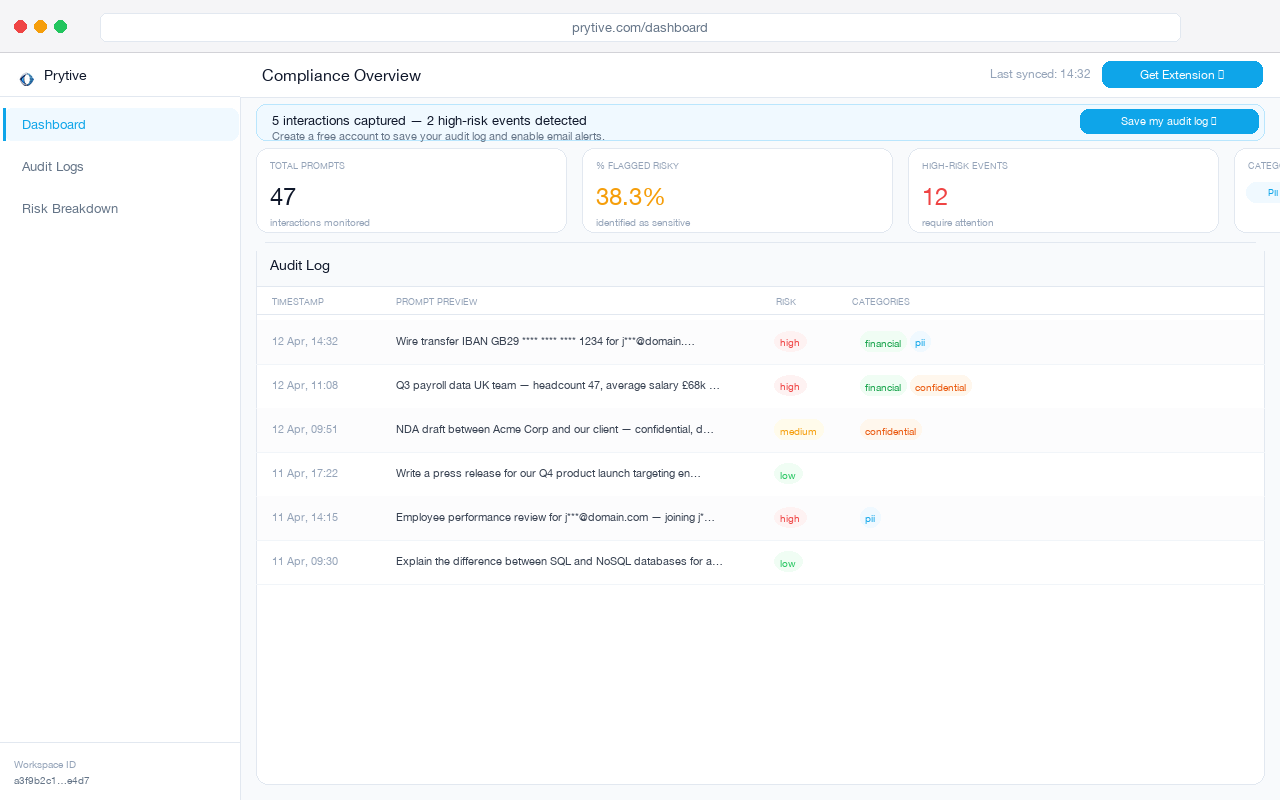
If you need a broader response structure after triage, the 72-hour AI incident response playbook goes deeper on sequencing.
The first 72 hours in practice
Hour 0 to 8: contain and preserve. Pause the account if needed. Identify whether this was ChatGPT, Gemini, Claude, Microsoft 365 Copilot, a browser extension, or a shadow tool. Confirm whether the user was on consumer, enterprise, API, or a personal account. Preserve redacted prompt artifacts and local evidence. Lock the calendar time when awareness was established.
Hour 8 to 24: scope the data. Were these names and emails, payment data, special category data under GDPR Article 9, or patient data? How many data subjects? Which customer owned the dataset? Was the AI vendor acting as processor, subprocessor, or an unsanctioned third party with its own retention rights?
Hour 24 to 48: make the legal call. GDPR Article 33 is about risk to rights and freedoms. Not every prompt leak is reportable. Some are trivial. Some are plainly not. A pasted patient list into a consumer ChatGPT account with unclear retention is not a paperwork exercise. It is a breach assessment. If the risk to individuals is high, GDPR Article 34 brings affected-data-subject notification into scope.
Hour 48 to 72: notify the right people. That can include your supervisory authority, the affected data subjects, the customer whose data was exposed if you are a B2B processor or service provider, and your E&O insurer. Do not leave the insurer to find out after a claim reserve gets discussed by someone else. If a processor did this on your data, demand preservation, timeline, account details, and deletion evidence immediately.
The printable 8-step checklist
You can download the 72-hour AI incident response checklist as a printable PDF below.
- Record the exact awareness timestamp and who established it.
- Preserve the redacted prompt, timestamp, tool name, account tier, and user ID.
- Identify affected data subjects, data categories, and whether special category or health data is involved.
- Confirm the AI vendor retention policy for that exact account type.
- Reconstruct missing prompts from employee recollection, source files, screenshots, browser history, and admin logs.
- Assess notification duties under GDPR Article 33, GDPR Article 34, HIPAA §164.404, HIPAA §164.410, and NIS2 Article 23 where applicable.
- Notify the supervisory authority, affected data subjects where high risk exists, the customer whose data it was, and your E&O insurer.
- Document containment, deletion requests, contractual escalations, and control fixes so the next Friday is less theatrical.
If your issue is really policy drift rather than one bad prompt, the one-page AI usage policy template is the shortest route to cleaner rules.
Frequently asked questions
Is every prompt leak a reportable breach?
No. GDPR Article 33 turns on risk to rights and freedoms. A harmless internal draft with no personal data is different from customer records pasted into a consumer LLM with uncertain retention.
What evidence should be preserved first?
Start with the redacted prompt, timestamp, tool and account tier, user ID, affected data subjects, and the vendor retention policy for that account. In that order.
Who owns AI incident response — security, legal, or compliance?
All three. Security contains. Legal assesses notification and privilege. Compliance and privacy keep the record straight, especially around Article 33 timing and Article 34 communications. One owner should run the clock.
Does the 72-hour clock apply if the AI vendor has zero-retention enabled?
Potentially, yes. Zero retention helps on risk and scope, but it does not erase the incident. You still assess whether personal data was disclosed or processed improperly and when awareness arose.
What if the employee used a personal account on a personal device?
You still assess the breach. It may be harder to preserve evidence, but your duties do not disappear because the prompt sat outside managed IT.
Instrument now. Prytive captures exactly the evidence base the 72-hour protocol requires at the browser layer, and the downloadable checklist is available at the link below.