In 30 minutes, you can know which AI tools are actually in use in your company. Not the tools you think are in use. The tools your DNS and proxy logs say are in use.
That matters because most AI risk work starts too late. Teams draft policy first, then hunt for usage. Reverse it. Find the traffic. Rank the tools by volume. Then decide what to control.
This is a practical Wednesday audit. No new agent. No procurement cycle. Just queries against data you already have.
The 30-minute AI tool discovery audit
Pull three data sources:
- DNS logs
- Proxy or secure web gateway logs
- Endpoint or MDM inventory
Start with DNS. It is usually the fastest path to a real answer. Search for these domains first:
- chat.openai.com
- chatgpt.com
- claude.ai
- gemini.google.com
- copilot.microsoft.com
- perplexity.ai
- poe.com
- character.ai
- mistral.ai
- cohere.ai
- huggingface.co
- replicate.com
If you use a SIEM, keep the first query blunt. You are not proving policy violations yet. You are establishing surface area.
index=dns domain IN (chat.openai.com, claude.ai, gemini.google.com) | stats count by user, domainExpand that pattern to the full list above. If your DNS logs do not carry user identity, group by source IP first, then map IP to device owner from DHCP, EDR, or MDM.
What you want from the DNS pass:
- Which domains appear at all
- Which users or source IPs hit them most
- Which business units are overrepresented
- Which days and hours the traffic clusters around
Then move to proxy logs. DNS tells you intent. Proxy tells you whether there was actual session activity and how much.
sourcetype=proxy bytes>1000 destination IN (chat.openai.com, chatgpt.com) | table user, destination, bytes, timestampThat bytes>1000 filter removes a lot of background noise, prefetching, and accidental page loads. Tune it if your proxy logs are sparse.
A stronger version looks like this:
index=proxy destination IN (chat.openai.com, chatgpt.com, claude.ai, gemini.google.com, copilot.microsoft.com, perplexity.ai, poe.com, character.ai, mistral.ai, cohere.ai, huggingface.co, replicate.com) | stats count sum(bytes) as total_bytes earliest(_time) as first_seen latest(_time) as last_seen by user, device, destinationNow you have a first-pass inventory.
Cross-reference with endpoint and MDM
This is where the audit becomes useful.
Take your top users and top devices from DNS or proxy logs and match them against endpoint telemetry. You want two answers:
- Which user visited the tool
- From which managed or unmanaged device
- When the visits happened
Good MDM data will give you device ownership, serial number, OS version, browser status, and whether the machine is compliant. If you have Microsoft Intune, Jamf, Kandji, Workspace ONE, or similar, export a device list and join on hostname, serial, Azure AD device ID, or the last known IP.
The point is not forensic perfection. The point is knowing whether your traffic is coming from:
- Managed corporate laptops
- BYOD endpoints
- Shared support machines
- Developer workstations with local admin rights
That last category often matters most.
A compliance operator may see 200 visits to Claude and panic. But if 170 came from six engineering devices in one week, you have a contained rollout problem, not a company-wide one.
Don’t miss the shadow category
Public AI websites are the easy part. The shadow category is self-hosted or local LLM tooling.
Look for internal IP traffic and process evidence tied to ollama and LM Studio. In logs, that may show up as:
- Internal connections to ports commonly used by local inference servers
- Device process names such as
ollama,ollama serve, orLM Studio - Browser access to internal endpoints on RFC1918 space such as
http://10.x.x.x:11434 - Repeated localhost or local subnet API calls from developer machines
This matters because local tooling often bypasses your normal SaaS review path. There is no obvious vendor login page, no new procurement record, and no external DNS hit if the model is being served inside your network.
If you have EDR, search process execution over the last 14 days. If you only have proxy and DNS, search for unusual browser or API traffic to internal IPs from power users. Self-hosted LLM use is common in engineering teams and almost invisible to policy-only controls.
Rank by volume, not by concern
Once you have the list, avoid the usual mistake.
Do not start with the tool that feels scariest. Start with the tool used most.
The most-used tools create the biggest exposure first. They generate the most prompts, the most copy-paste events, and the most chances for customer data, deal terms, source code, health information, or case notes to leave the browser.
So rank your results by:
- Total sessions or DNS hits
- Distinct users
- Managed versus unmanaged devices
- Repeat usage over 7 to 14 days
That gives you the order for instrumentation. If ChatGPT and Copilot dominate usage, those are your first control points. If Perplexity appears only twice, leave it lower on the list until the heavy traffic is covered.
DNS-level visibility is a good start. Prompt-level visibility is the full picture.
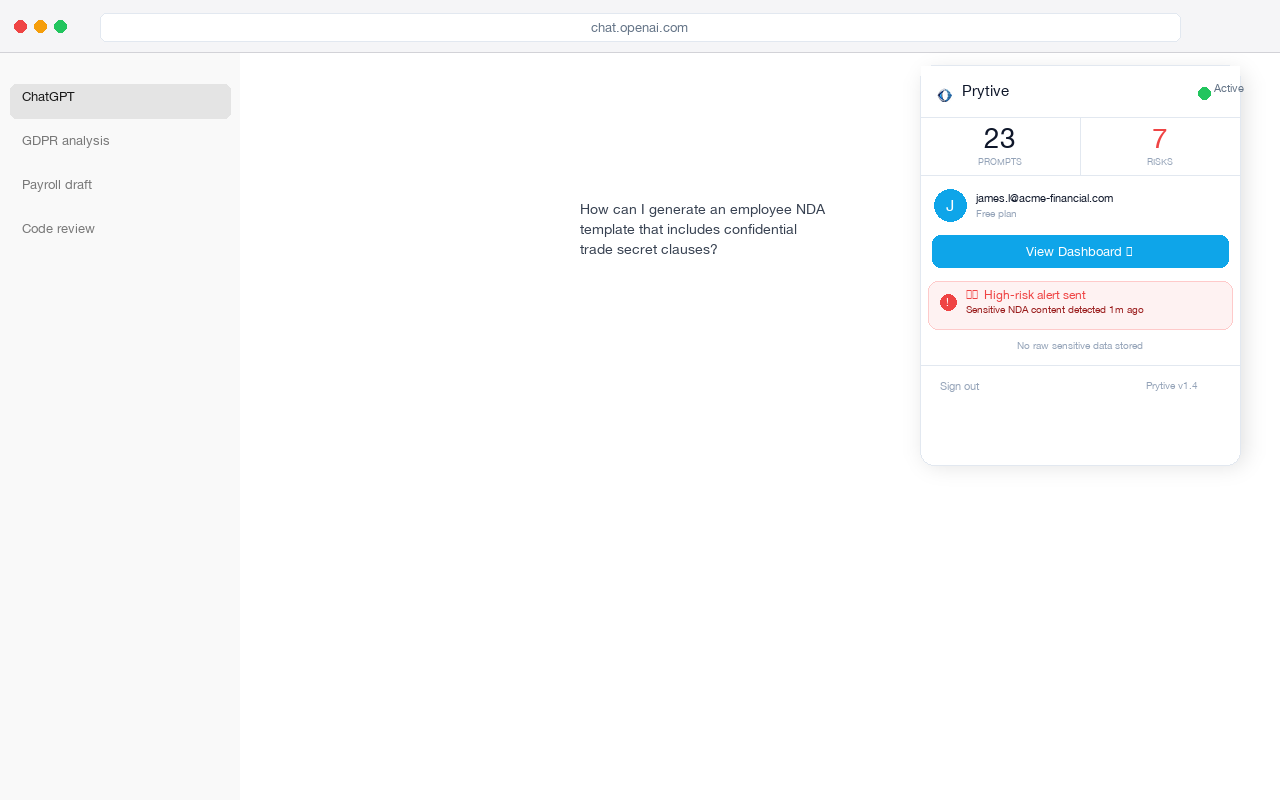
Once you can see prompts before they leave the browser, you stop guessing about whether a visit turned into a data exposure event. You can tell which tool was used, by whom, and what category of sensitive data was caught, without storing the raw sensitive text.
What good looks like after the audit
By the end of this exercise, you should have:
- A ranked list of AI tools actually used in your environment
- Named users and devices behind the top traffic
- A separate list of likely self-hosted LLM activity
- A short list of the first 2-3 tools to instrument
That is enough to move from policy theatre to operational control.
If you report into compliance, tie this back to real obligations. GDPR Article 5(1)(f) requires integrity and confidentiality of personal data. GDPR Article 32 requires appropriate technical and organisational measures. For US health data, the HIPAA Security Rule at 45 CFR §164.312 requires technical safeguards around access and transmission. You cannot meet those standards on AI usage you have not inventoried.
The 5-step playbook you can do this afternoon
1. Query DNS for the known AI domains
Search for:
- chat.openai.com
- chatgpt.com
- claude.ai
- gemini.google.com
- copilot.microsoft.com
- perplexity.ai
- poe.com
- character.ai
- mistral.ai
- cohere.ai
- huggingface.co
- replicate.com
Group by user, source IP, and domain.
2. Validate with proxy or web gateway data
Filter for meaningful traffic volume and extract user, destination, bytes, and timestamp. Confirm which tools were really used, not just resolved.
3. Join against MDM or endpoint inventory
Identify the user, device type, management state, and last-seen time. Separate managed laptops from BYOD and developer machines.
4. Check for shadow local LLM use
Search EDR and internal traffic for ollama, lm-studio, localhost inference servers, and internal IP endpoints.
5. Rank by volume and pick the first controls
Start with the top 2-3 tools by usage. Instrument those first. That is where your risk reduction happens fastest.
Run the audit today. Then run a 14-day Prytive pilot on the top 2-3 tools you find.